
The week behind the numbers
Dog activity tracker app: see your dog’s week in PupMarks
See recorded dog walks, estimated distance, PupMarks, unique paths, and days out in the PupMarks weekly recap. Review the activity saved for each dog.
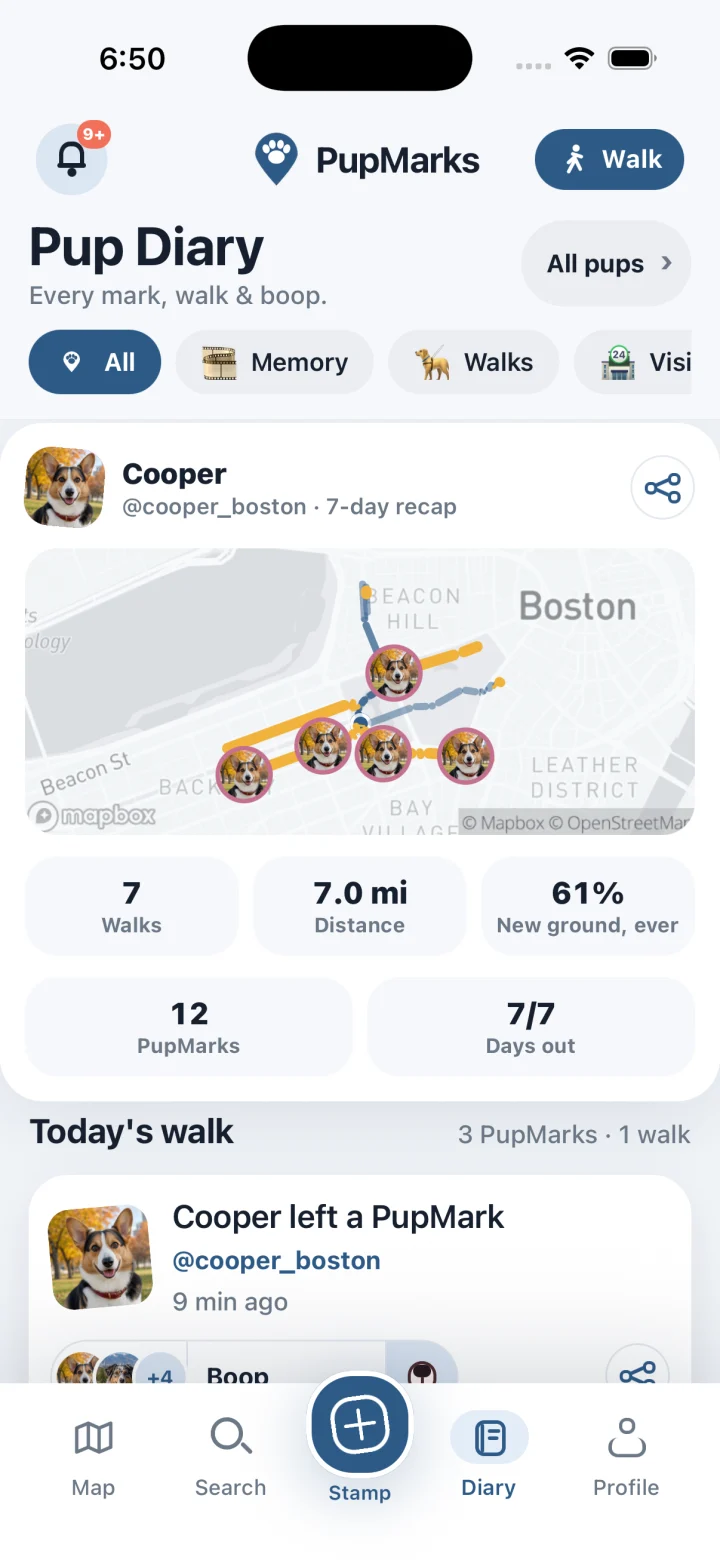
PupMarks summarizes the dog walks you record in the app. The weekly recap shows recorded walks, estimated distance, PupMarks, unique paths, and days out.
PupMarks brings recorded walks and moments into Pup Diary. Open your recap and enjoy the story you saved. Your next favorite outing might already be waiting there.
Look back at your recorded week
Your diary grows with the outings and PupMarks you add. A weekly recap brings that recorded activity together.
- Open Pup Diary.
- Find your pup’s weekly recap.
- Review the recorded walks, distance, PupMarks, and days out.
The recap counts the outings you chose to record. Some weeks hold more saved walks than others, and each total reflects what you saved in PupMarks.
Our exercise log guide shows how to log your daily walks in PupMarks.
What each recap number means
Walks brings your recorded outings into view. Distance summarizes their estimated paths. PupMarks represents the moments you chose to keep.
Days out shows how recorded outings filled your week. Read these details together, then remember the experiences behind them.
A short stop saved as a PupMark can become your favorite photo, and it counts toward your recap.
Open a past walk again
Each saved walk keeps its details in Pup Diary.
- Find the walk in Pup Diary.
- Open its recap.
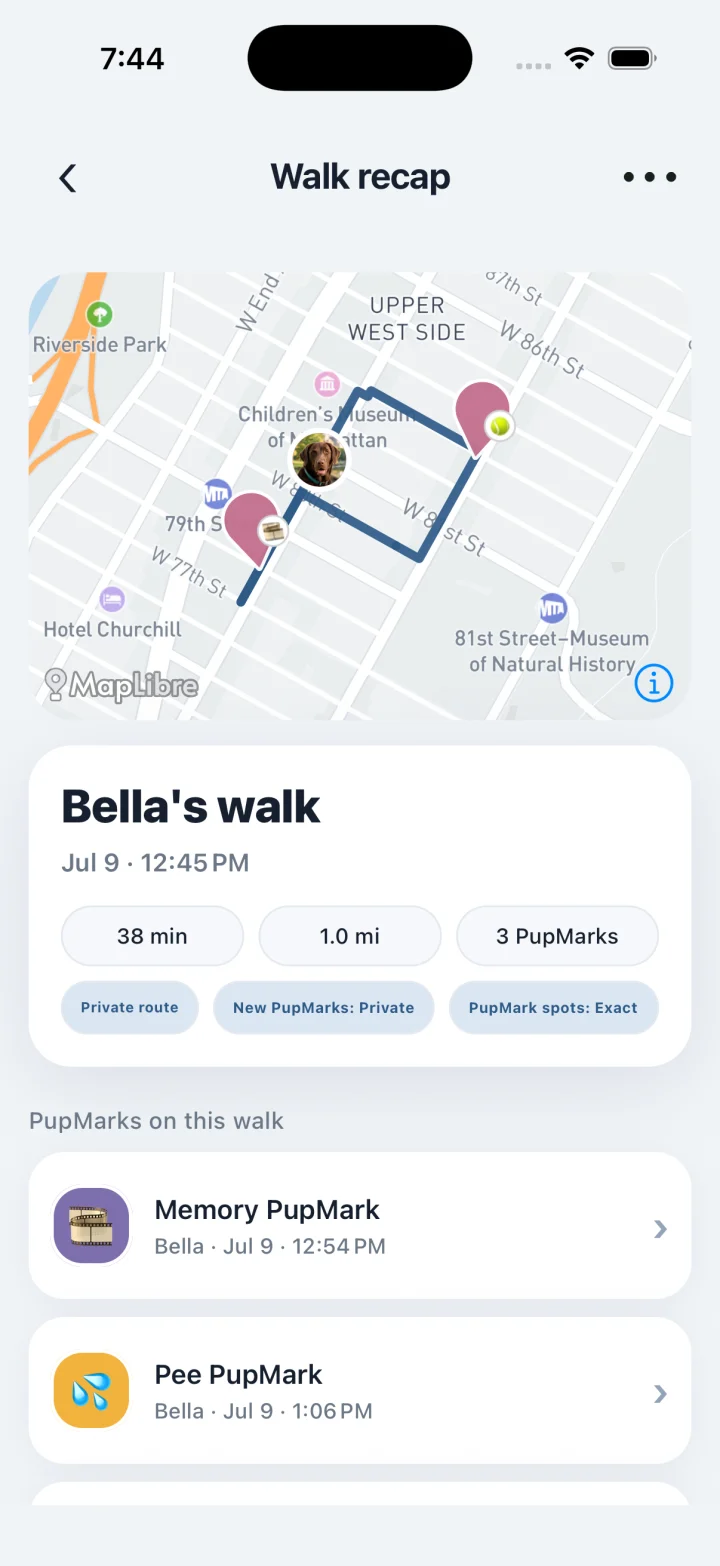
- Review the route, duration, and estimated distance.
- Revisit a PupMark saved during the outing.
Open a PupMark to see the photo or note you saved, such as a shady bench or a familiar friend.
Our GPS guide explains how to read the route in your recap.
Choose who sees each PupMark
Exact recorded routes stay private in PupMarks. Individual PupMarks have their own audience and location-precision choices.
- Choose a PupMark you would like to share.
- Review its audience.
- Check its location precision.
Keep the moment personal or share it with your chosen audience. The FAQ explains the current privacy labels.
Record your next walk
On your next outing, record your usual loop, add a note, and save a photo as a PupMark.
The walk tracker guide walks you through recording. The dog profile guide shows how to set up each pup’s profile.
Open PupMarks before your next walk. Choose your pup and let another little adventure become part of the story.
Who is a dog activity tracker for?
The weekly recap is for people who like seeing a week of outings in one place.
- Owners building a routine: see which days had a recorded walk and which days did not.
- People with several pups: the recap is shown per pup, so each dog’s week stays separate.
- Puppy owners: see the first weeks fill up with walks and PupMarks you chose to save.
- Memory keepers: the numbers sit next to the photos and notes behind them.
Step by step: open your weekly recap
- Open Pup Diary.
- Choose the pup you want to look at.
- Find the recap cards and read the recorded walks, distance, PupMarks, unique paths, and days out.
- Open a walk from the Diary to see what is behind a total.
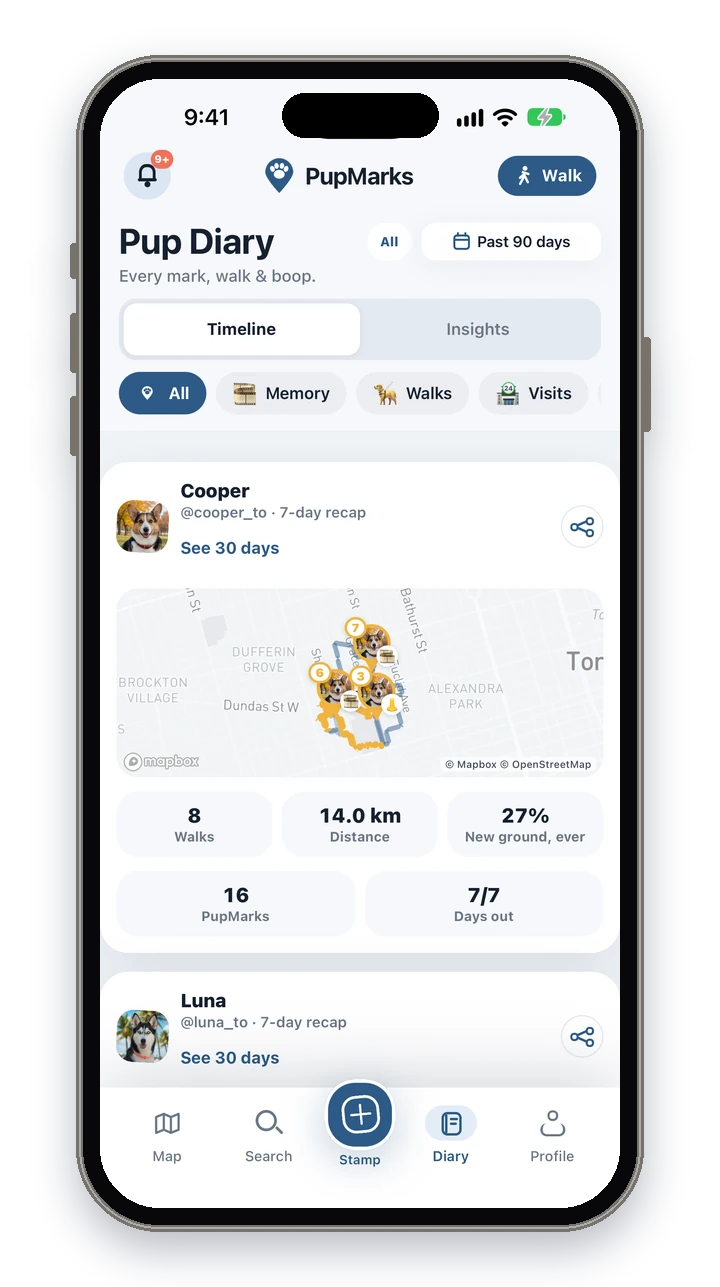
The recap counts what you recorded in the app, so a quiet week usually means fewer walks were saved, not that your pup did less.
Step by step: record a walk that counts
- Open PupMarks and tap Walk.
- Choose the pups joining you, then tap Start walk.
- Tap PupMark at a stop to save a moment.
- Tap Stop when the outing ends. It joins your recap.
Tips for reading your recap
Read the totals together. A week with few walks but many PupMarks tells a different story from a week with many short walks. Unique paths shows how varied your routes were, and days out shows how many days had a recorded outing.
If you want fuller recaps, record the walks you usually skip, such as the short evening loop. Recent saved history is available in the app, and optional PupMarks Plus gives access to older saved history.
Pup Diary shows a recap for each pup, so a weekly look is enough to notice a pattern, such as a favorite route showing up again and again.
Frequently asked questions
Is PupMarks free?
Free to download on iPhone and Android. Owner features and recent saved history work without a subscription. Optional PupMarks Plus gives access to older saved history. Check the app for the current free history window, subscription price, and terms.
Does PupMarks work on iPhone and Android?
Yes. PupMarks is available on the App Store for iPhone and on Google Play for Android.
What does the weekly recap show?
Walks, distance, PupMarks, unique paths, and days out, shown for each pup.
Can I walk two dogs at once?
Yes. Pick the pups before the walk starts. In the Stamp sheet, choose which pups each PupMark belongs to.
Does it count walks I did not record?
No. The recap counts the activity you recorded in the app. Distance is an estimate based on your phone’s location.
Can I see older walks?
Recent saved history is available in the app. Optional PupMarks Plus gives access to older saved walks, PupMarks, Diary entries, and activity. Check the app for the current free history window.
Does recording a walk use battery?
Recording uses your phone’s location (GPS), which uses battery while a walk is active. Recording ends when you tap Stop.
Can I add photos later?
Yes. You can save a PupMark on its own, with a photo or note, at any time. PupMarks you add count toward your recap, so the totals reflect the moments you chose to keep.
Related guides
- Dog exercise tracker guide: build a simple recording habit around your usual walks.
- Dog walking tracker guide: record a walk and save a PupMark from start to finish.
- Pup Diary for more than one dog: keep each pup’s week in its own space.