
Pup Diary, your way
How do I customize my Pup Diary?
Open a PupMark in your Pup Diary, tap Edit, and pick a look. Add stickers, write your own words, crop the photo and add a second photo, then save.
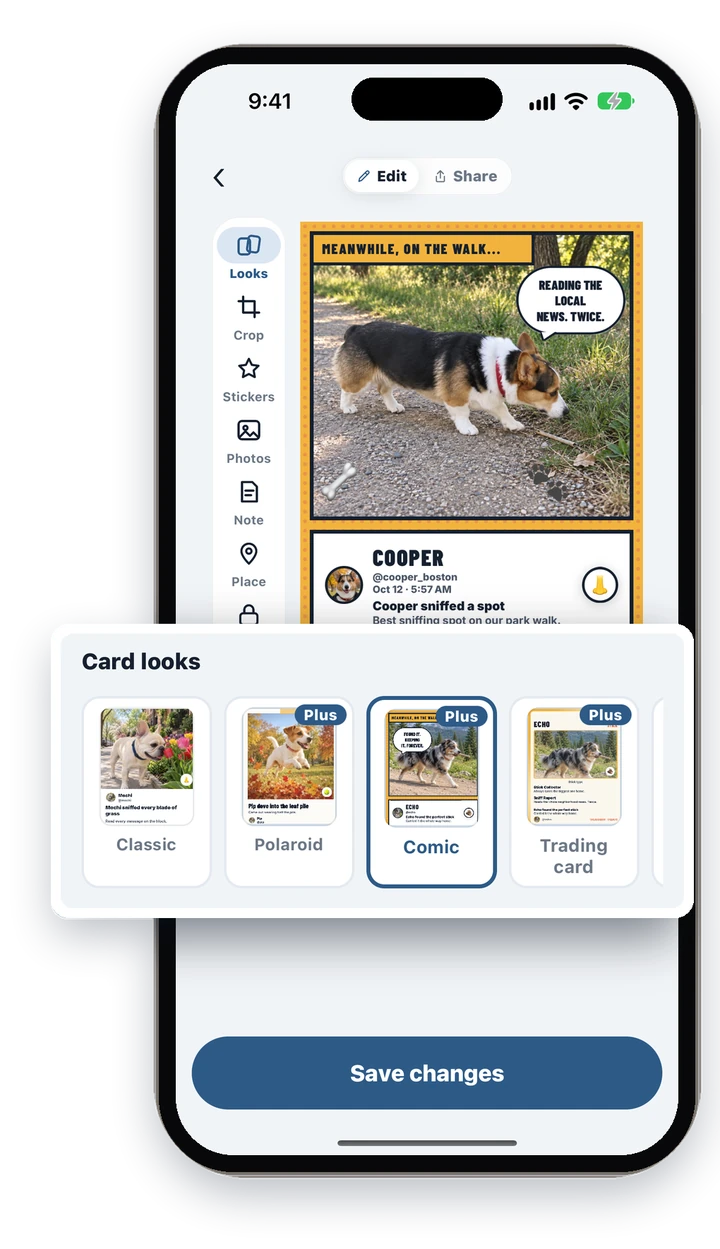
How do I change how a card looks?
Tap Edit on a PupMark, then Looks. Each PupMark card can wear one of 22 looks, and Classic is the one every card starts with.
- Open the PupMark in your Pup Diary.
- Tap Edit.
- Tap Looks and choose a look in the Card looks row.
- Tap Save changes.
PupMarks may ask if you want to keep this look in your pup’s diary. Tap Keep it and the card wears that look wherever the moment appears: your Pup Diary, the map sheet, the PupMark page and the feeds of people you share with.
What is free, and what needs PupMarks Plus?
Classic is free, and so is cropping. The other 21 looks come with PupMarks Plus.
Not ready for Plus? Free accounts can style 5 moments with looks, stickers and extra photos to try them out. If PupMarks Plus ends, the cards you already styled keep their look. The app shows how many free styled moments you have left.
How do I add stickers?
Tap Stickers, then tap a sticker to put it on the card. You can add up to 3 per card.
- Open Stickers.
- Tap a sticker: Heart, Star, Paw, Bone, Crown, Sparkles, Leaf, Snowflake or Pumpkin, or a Speech, Thought or Shout bubble.
- On the card, drag to move it, pinch to resize and twist to turn it.
Stickers sit on the photo, so add a photo first if the moment does not have one. Choose Remove all stickers to clear them.
Can I write my own words on a card?
Yes. Tap a line on the card, such as the headline or a speech bubble, and type your own words.
You can move, resize and turn a line, change its color from the look’s own colors, or take it off the card. Tap Put it back to return to the original line. Use the Note tab to write the note that goes with the moment.
How do I crop the photo?
Open Crop, drag the photo to reframe it, pinch to zoom and double-tap to fill the frame.
Your original photo is never changed. Cropping is always free, even on Classic.
Can I add a second photo to a card?
Yes, on looks that have room for more than one photo, such as Polaroid, Film strip and Scrapbook. Open Photos and pick a photo from one of your other PupMarks.
Until you pick one, the card repeats the main photo. If the photo comes from a private PupMark, the app warns you first, because it will show on this card.
What if I change my mind?
Tap Reset look to go back to the card as it was, or tap Not now when PupMarks asks if you want to keep a look.
Want to see the looks first? See the card looks on the home page. You can also style your walk cards, turn walks into a video or read the dog diary guide.