
Replay
How do I turn my walks into a video with Replay?
Tap Relive it on a walk, or Relive this adventure on your weekly recap. Replay makes a vertical 9:16 video on your phone. Edit it, tap Save video and it lands in Photos.
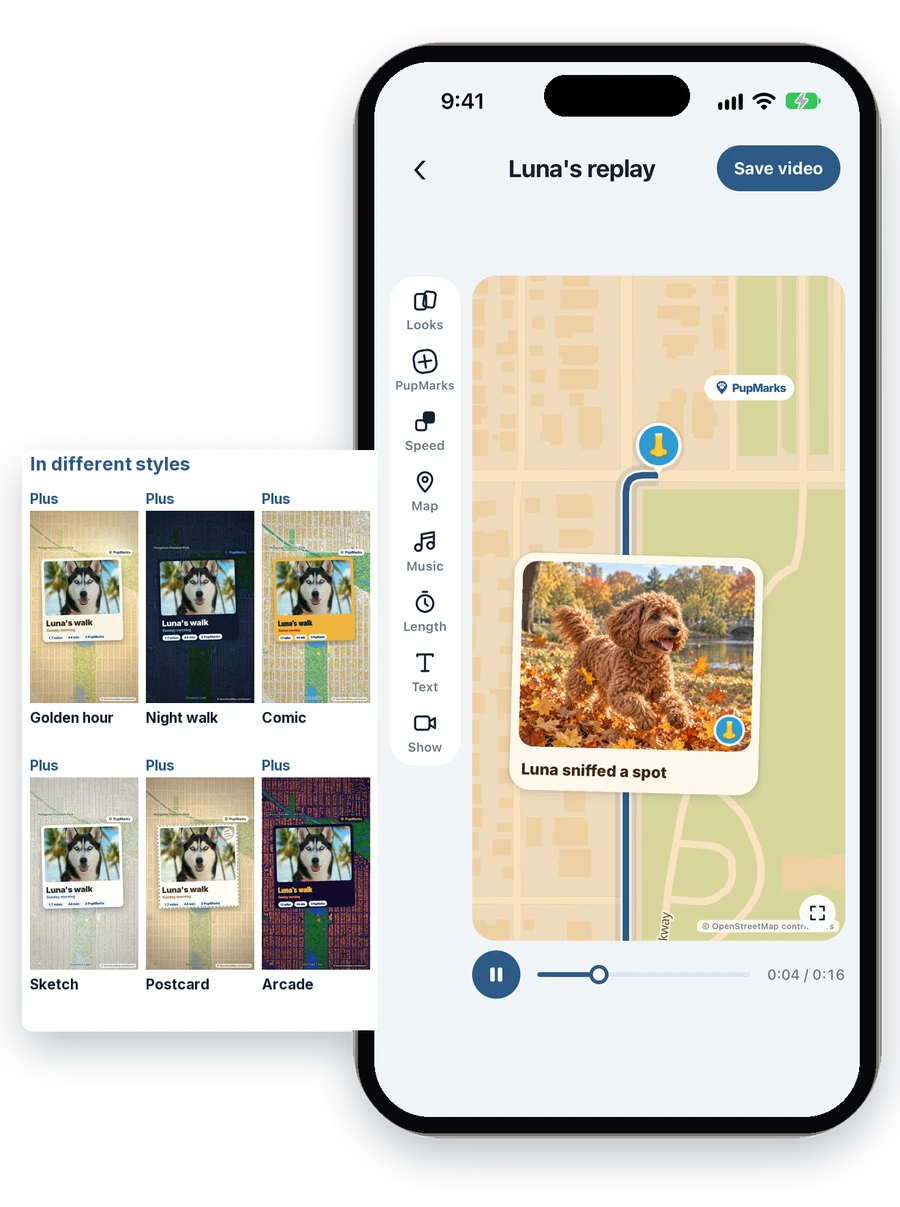
What is Replay?
Replay turns a walk into a vertical 9:16 video of the route, with the PupMarks you saved popping up along the way. It is made on your phone.
How do I make a replay of a walk, a week or a month?
- A walk: open the walk and tap Relive it.
- A week: tap Relive this adventure on your pup’s weekly recap in the Pup Diary.
- A month: tap the Relive card for a finished month in the Pup Diary, such as Relive September. A month needs 5 PupMarks or two walks of at least 5 minutes each.
Week and month replays are for your own pups, and they stay within 120 seconds.
Which looks does Replay have?
Replay has 12 looks: Diary, Golden hour, Night walk, Sketch, Arcade, Sports, Documentary, Mission, Postcard, Comic, Trail guide and Trailer. Diary is free, and the other 11 come with PupMarks Plus.
What can I edit in the Replay editor?
The tools sit down the left side of the screen. Tap a tool to open its options.
- Looks: choose the look.
- PupMarks: choose which PupMarks appear, how they pop in and how long they stay.
- Speed: play part of the walk faster or in slow motion.
- Map: follow the walk or show the whole route, and set the rotation, tilt and zoom.
- Music: pick a song, or no music, and choose where it starts.
- Length: let it fit the walk, or choose a length.
- Text: write the title on the opening card and the end.
There is also Show, for the route, the stats card and the end card. Show is free. The other editing tools come with PupMarks Plus.
How do I keep my start and end private?
Open Show and switch on Hide start and end. The video leaves out a short stretch at each end, so it does not show where the walk began or ended. PupMarks with an approximate place stay out of videos.
How do I save a replay to Photos?
- Tap Save video.
- Choose a quality: Auto, Fast (480p), Standard (720p) or High (1080p).
- Tap Save to Photos and wait for the confirmation.
You can keep using PupMarks while it saves. If PupMarks asks for permission to add to Photos, allow it in Settings and try again.
What happens if I leave the app while it saves?
Saving pauses when you switch to another app and continues when you come back. If notifications are on, PupMarks sends a reminder that your export is paused. Open PupMarks to finish it, and please do not close the app until it is done.
How do I share my replay on Stories, TikTok or Reels?
When your replay is saved, tap Share to open your phone’s share sheet and choose an app such as Instagram or TikTok. The apps you see depend on your phone. Or open the video in Photos and post it from there.
The 9:16 shape fits Stories, TikTok and Reels. See the Replay section and the sharing section on the home page, or style your walk cards first.